Every event has its own page. This is where you find all the detail you need to decide whether to book.
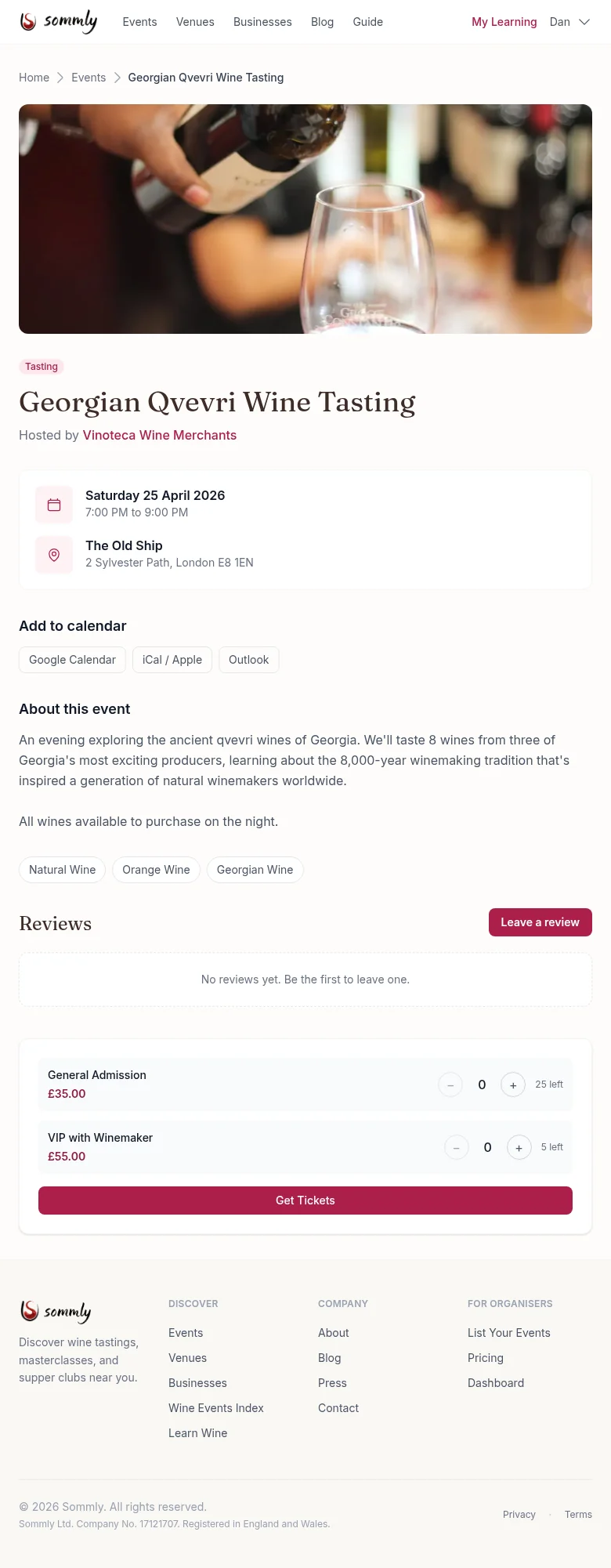
What you will see
- Cover image and title at the top, with the event type badge (Tasting, Masterclass, and so on).
- Hosted by. The business or organiser running the event. Tap the name to see everything else they run.
- Date, time, and venue. Full address, a link to add the event to Google Calendar, iCal, or Outlook.
- About this event. What will be poured, what is included, and anything you should know before you arrive.
- Tags. Tap any tag to find similar events.
- Reviews. Star rating and written feedback from people who have been. You can leave your own after attending.
- Tickets. One or more ticket types with prices and remaining capacity.
External events
Some events link out to the organiser's own website to book. You will see an Book with organiser button instead of the ticket picker. That just means the business has not connected Sommly ticketing yet. You can still favourite the event and leave a review after.
Discount codes
Some businesses publish a discount code for visitors who book through Sommly. You will spot it as a small burgundy card next to the booking section, with a description like "10% off all bookings" and a Reveal code button.
Tap the button to show the code, then hit Copy code and paste it into the merchant's checkout when you book. The code is hidden until you tap on purpose so deal-scraper bots cannot lift it.
On an event page you might see two cards: one specific to that event, and one that applies to every event the business runs. The second is labelled From {business name} so it is clear they are separate offers. You can use whichever applies, but not both at once on the same booking.
Tip
Tip